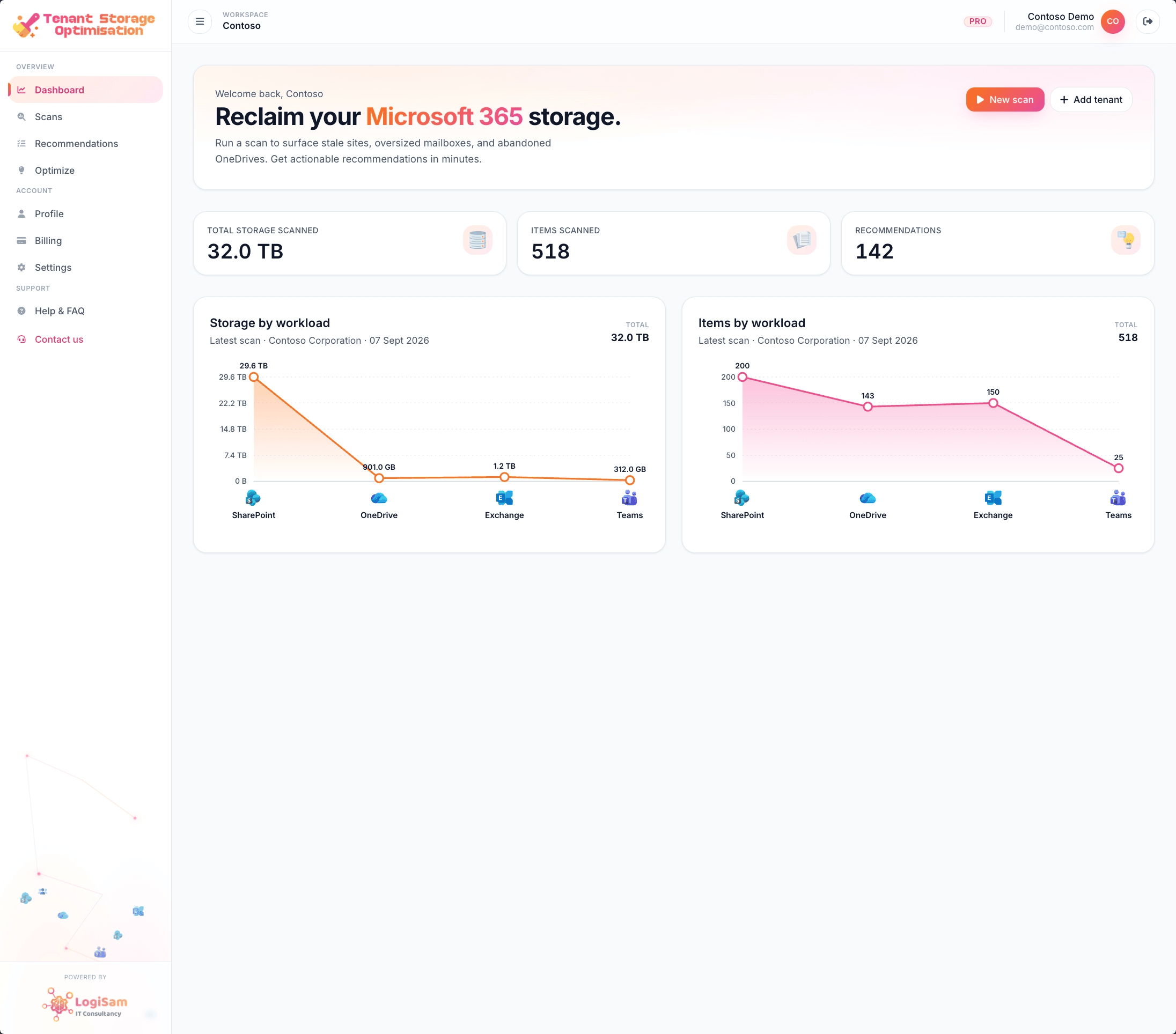
Get more from your Microsoft 365 storage — safely, in days.
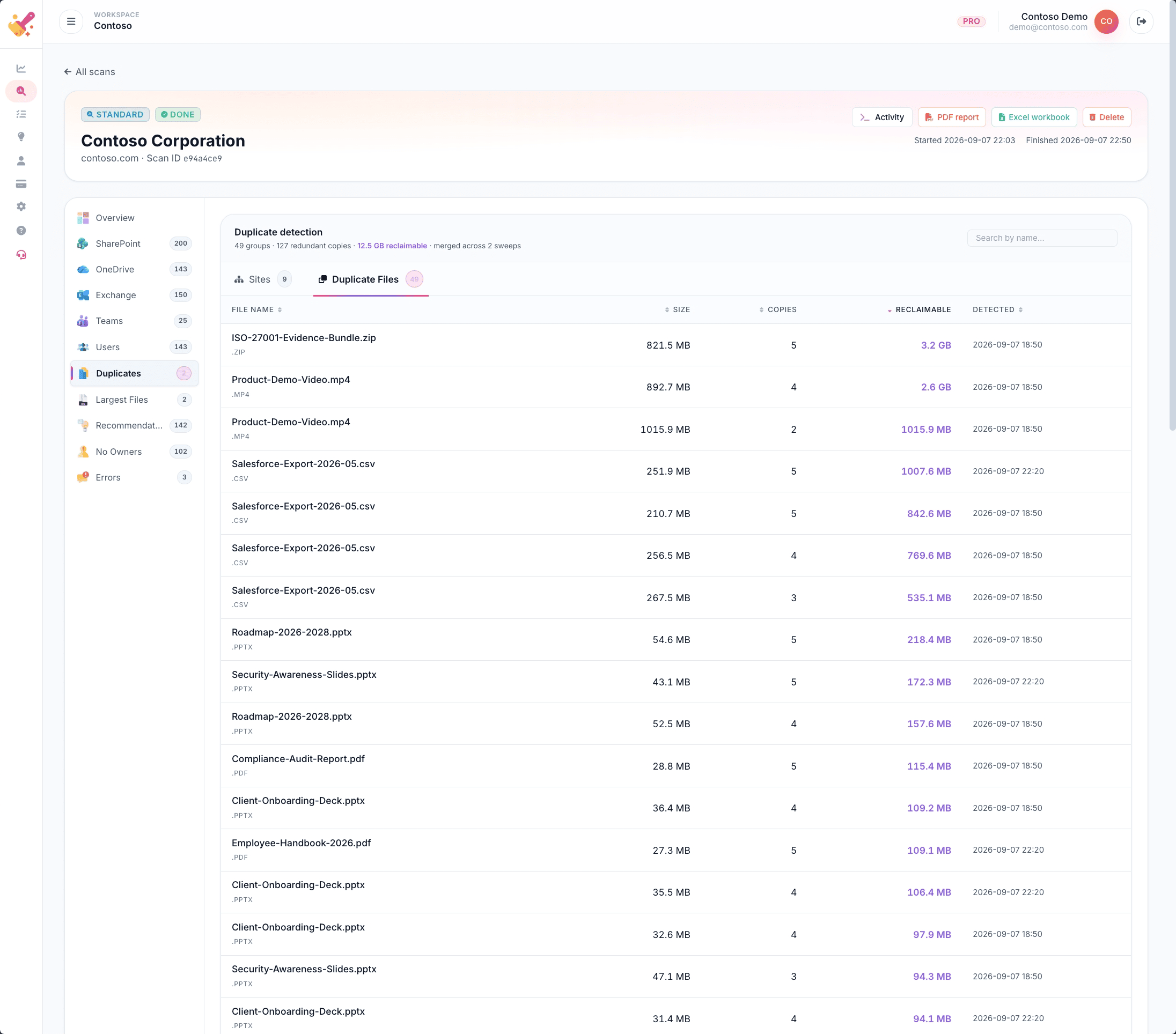
TSO scans SharePoint, OneDrive, Exchange and Teams to surface the duplicates, oversized files and stale content weighing your tenancy down. Read-only by design. Client-ready PDF & Excel reports.
Microsoft 365 SSO · Read-only Graph permissions · No agents to install
Pay for what matters
Only pay for the M365 storage you actually use.
The mid-size tenants we scan typically hold 20–40% of their storage in duplicates, stale drafts and orphaned OneDrives — bytes nobody is opening. TSO surfaces them, ranked, so every gigabyte your Microsoft 365 tenancy holds is earning its keep.
Ten versions of the same "expenses policy" and Copilot happily quotes the wrong one — the 2018 draft nobody retracted. TSO surfaces duplicates, stale drafts and orphaned OneDrives so your ground truth is clean before you roll Copilot wider.
TSO requests only read scopes from Microsoft Graph — Sites.Read.All, Files.Read.All, Reports.Read.All. No delete, no move, no modify. Every finding is a recommendation, ranked by confidence, for your admin to act on.
SOC 2 friendly · UK South data residency · Full audit trail
Buy it from Microsoft
Now on the Microsoft & Azure Marketplaces.
Deploy TSO in minutes and bill it against your existing Microsoft agreement. One-click provisioning from the Azure Portal or through the Microsoft 365 admin centre — single sign-on with your existing Entra tenant.
One-click provisioning · UK South, Sweden Central, US regions · Consolidated Microsoft invoice
Get it from
One-click deploy under your existing Microsoft agreement. Both listings resolve to the same TSO tenant instance — buy where procurement is easiest.
Built for Microsoft 365SharePoint OnlineOneDrive for BusinessMicrosoft TeamsExchange OnlineAzure Marketplace
Why TSO
The problem it solves — in one page
Storage bloat is quiet, cumulative and expensive. TSO exists to make it visible, ranked, and safe to act on.
The problem: silent, compounding storage bloat
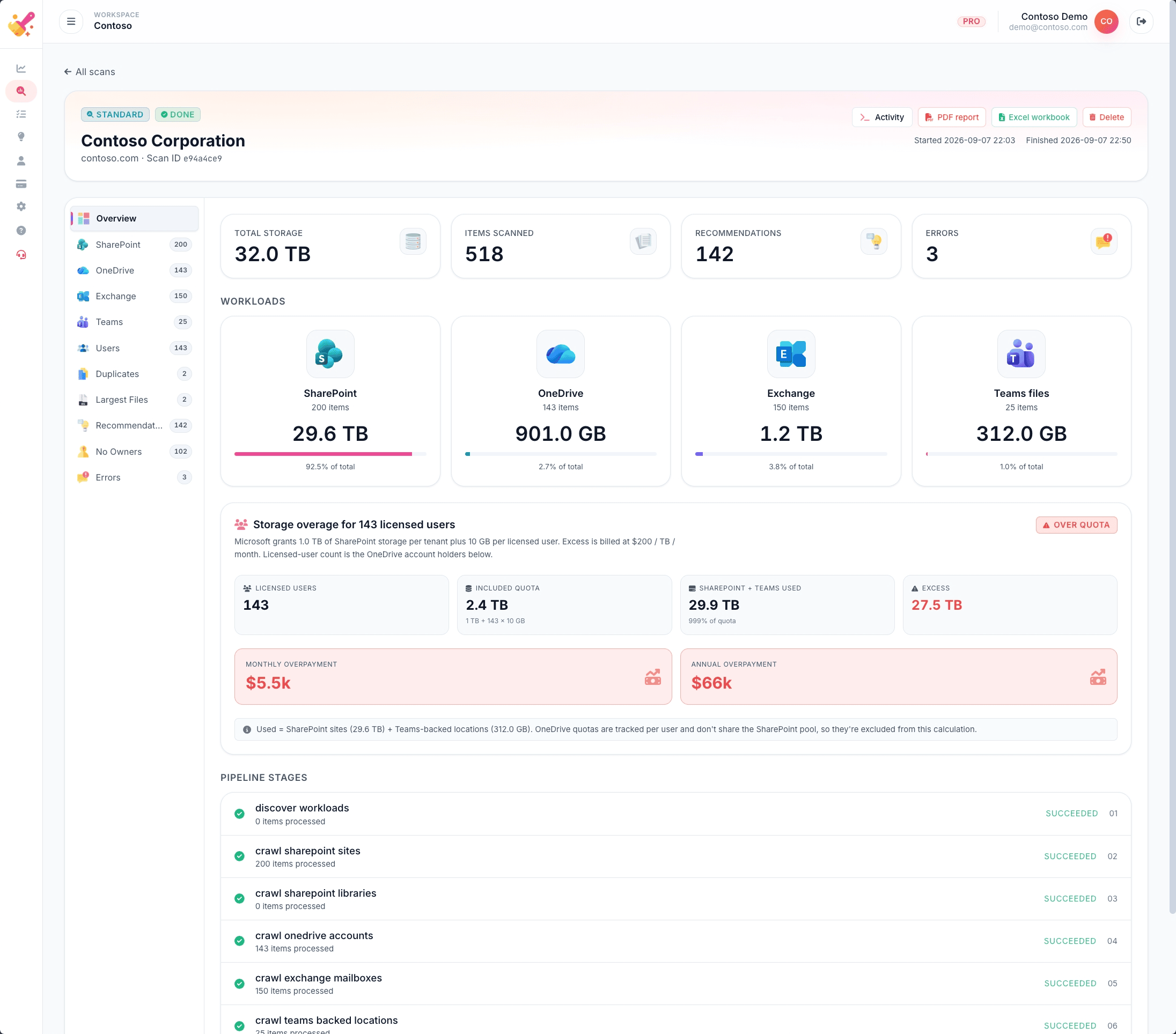
Additional Microsoft 365 storage is priced at $0.20 per GB per month, and typical mid-size tenants hold 20–40% they no longer use. Old drafts, duplicates and ex-employee OneDrives grow every quarter — nobody deletes anything, and the tenancy quietly carries the cost.
The other problem: Copilot hallucinations
Copilot for Microsoft 365 searches everything the user can see. Ten versions of the same "HR policy" — half of them stale — and Copilot happily quotes the wrong one, confidently. TSO surfaces the duplicates and orphaned drafts so your ground truth is clean before rollout.
Why native admin tools miss both
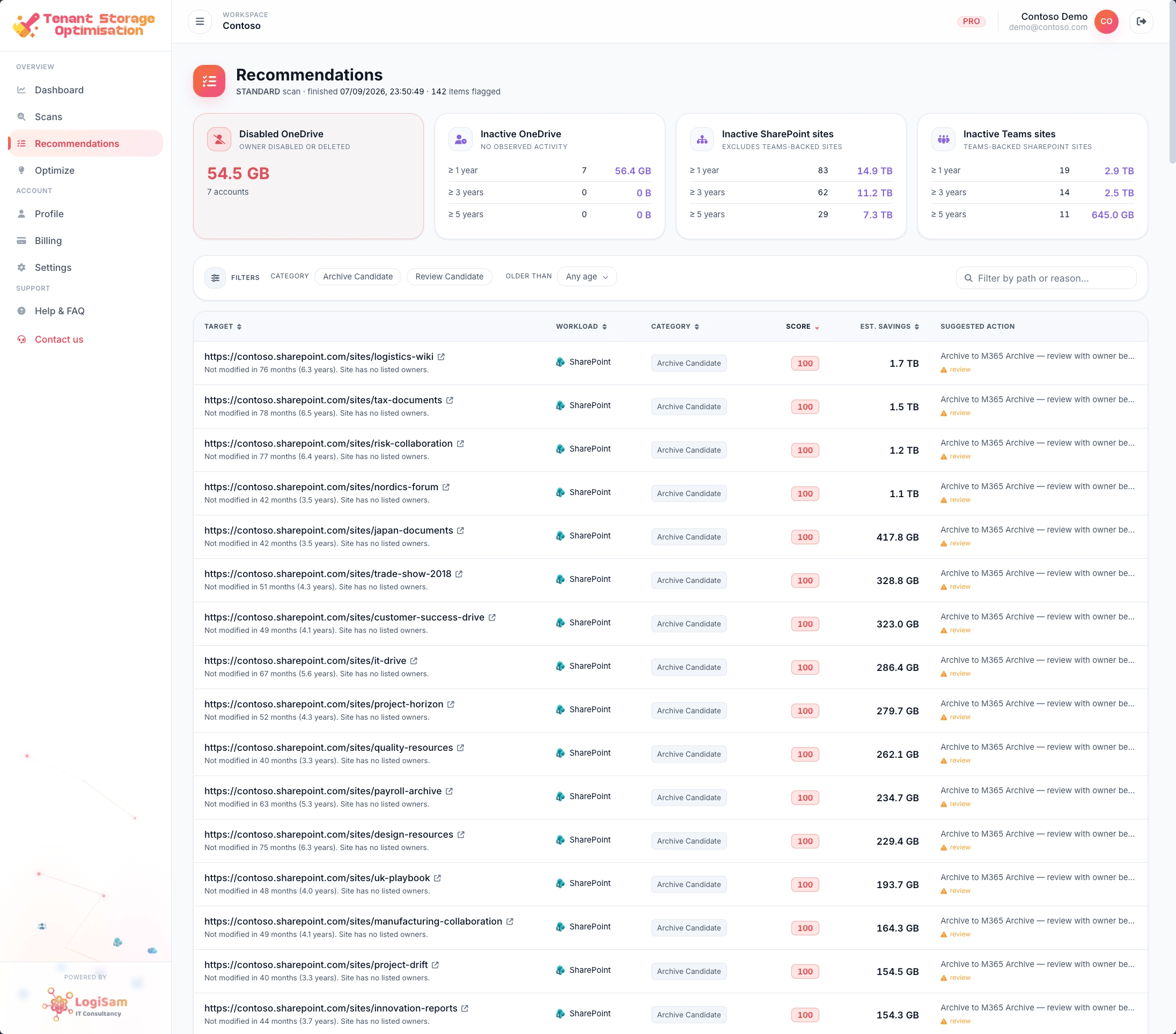
The SharePoint admin storage report shows totals per site — not which files, which owners, which duplicates. Copilot data-quality issues never appear in those reports. TSO surfaces both, ranked and exportable.
What TSO does about it
One consent, one scan, one ranked reclaim list per workload. Each finding carries the site, owner, size, age and reclaim estimate, so an admin can act in minutes — or hand it to the data owner with the receipts.
Reports your clients will read
Every scan produces a branded PDF and an Excel workbook, ready to hand to a customer, CIO, or finance team. MSPs on the Enterprise tier can white-label them under their own brand.
Alongside the Microsoft admin centre
What TSO adds on top of native M365 dashboards
TSO is designed to complement the surfaces IT admins already know. Same tenant, same permissions model — one focused view for cleanup and reclaim.
Copilot for Microsoft 365 grounds every answer in the files the user can already see. When that includes ten versions of the same policy — half of them out of date — the answer is confidently wrong. TSO surfaces the duplicates and stale drafts so your ground truth is clean before you roll Copilot wider.
Before TSO
Employee asks Copilot
“What is our expenses policy?”
Our expenses policy sets a £30 daily meal cap for domestic travel and requires manager approval for anything over £500. Alcohol is not reimbursable.
⚠ Answer combines wording from three different documents — one drafted in 2018 and never retracted.
Copilot cited
StaleHR-Policy-Expenses-2018-DRAFT.docxHR / Old policies
Cull the 2018 draft and the orphaned OneDrive copy. Retain the HR-owned 2026 final as the single source of truth. Copilot will quote from it — and only it — going forward.
Reclaim 4.2 MB · Removes 2 confused Copilot sources · One click to export the action list.
Recommended actions
ArchiveHR-Policy-Expenses-2018-DRAFT.docx+2.1 MB
DeleteSam Torres' OneDrive copy+2.1 MB
KeepHR Policy — Expenses (Final).docxOwned
10 versions, no ground truth
The 2018, 2021 and 2026 versions of your expenses policy all live in the tenant. Copilot has no way to know which one is authoritative — so it will happily quote from any of them.
Stale drafts outrank current
A pinned 'Pricing 2018 draft' still surfaces above the live pricing site because it was popular once. Copilot picks it up and quotes 2018 numbers to a 2026 customer.
Ex-employee OneDrives leak
An orphaned OneDrive still visible to the user's manager keeps working policy drafts alive years after the author left. Copilot cheerfully quotes them.
We only read. Never write. Never touch your files.
TSO requests only the Microsoft Graph read scopes below. The Graph API physically will not let us delete, move or modify anything in your tenant — even if we wanted to.
What TSO does read
Exactly these Microsoft Graph scopes — no more, no less.
Sites.Read.All
Read SharePoint site + drive metadata.
Files.Read.All
Read file metadata — name, size, hash, timestamps. Never contents.
Reports.Read.All
Read the usage reports Microsoft already generates for the tenant.
Directory.Read.All
Resolve user and group names for the ownership column.
User.Read.All
Resolve mailbox owners.
What TSO cannot do
Even with your consent. The Graph API blocks it.
Delete files, sites, mailboxes or messages
Move or rename anything in your tenant
Modify permissions, sharing links or labels
Read file contents, email bodies or Teams messages
Send email or post to Teams on your behalf
Create or change apps, users, groups or policies
Revoke access anytime from the Microsoft Entra admin portal → Enterprise applications → TSO → Remove.